×

Back to Articles

Understanding Your Monthly Job Promotion Credit in Newly

Understanding Your Monthly Job Promotion Credit in Newly

Every Newly Premium Hiring subscription includes 1 Job Promotion Credit each month — a simple way to give one of your active job listings more visibility and put it in front of the right aged care and disability support workers.

This guide explains what your monthly Promotion Credit is, what it includes, and how to get the most value from it each month.

What Is a Job Promotion Credit?

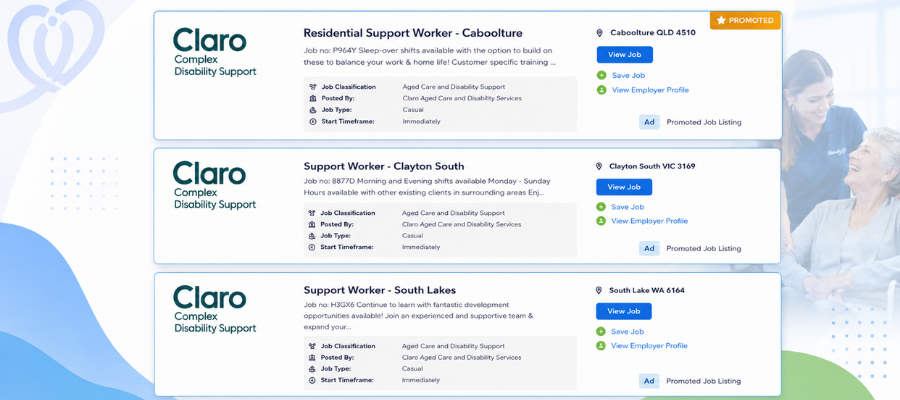
A Job Promotion Credit lets you upgrade a standard job listing into a Promoted Job.

While a standard listing appears in the general job search results, a promoted listing receives priority placement and enhanced employer branding, helping it stand out to aged care and disability support workers using the Newly platform.

As a Premium Hiring subscriber, you receive 1 Job Promotion Credit automatically each month at no additional cost. There is no lock-in contract, and you can cancel your subscription anytime.

What Your Promotion Credit Includes

When you apply your monthly Promotion Credit to a job listing, you'll unlock:

  • Priority Placement - Your promoted job appears prominently in search results and job listings for up to 30 days, giving it greater visibility to suitable workers.
  • Dedicated Job Post Manager - Receive hands-on support from a dedicated Job Post Manager to help optimise your promoted listing and improve hiring outcomes.
  • Targeted Email Alerts - Your promoted job is sent directly to aged care and disability support workers who match your selected role, location, and job criteria.
  • Employer Branding - Showcase your organisation by displaying your company logo, employer profile, articles, and brand content alongside your promoted listing.
  • Send to 20 Matched Candidates - Your vacancy is matched with suitable aged care and disability support workers and sent directly to up to 20 matched candidates, helping you connect with qualified workers without manually searching.
  • Video Promotion - Add a workplace or employer video to your promoted job to help your listing stand out and give candidates a better understanding of your organisation and role.
  • Peer Referral & Partner Site Promotion - Extend your reach through trusted referrals and featured placement across Newly's partner network to increase exposure to qualified aged care and disability support workers.

How to Use Your Monthly Promotion Credit

Applying your credit takes just a few steps inside your employer account — log in, create or open a job listing, add your branding or video, and select Post as Promoted under Listing Options.

For the full step-by-step walkthrough, see our companion guide: How to Post and Promote a Job Listing on Newly.
Making the Most of Your Monthly Credit

Because you receive one Promotion Credit every month, planning ahead helps you get the best results.

  • Use it for your highest-priority or hardest-to-fill role.
  • Complete your employer profile before promoting your job.
  • Add your logo, cover image, or workplace video to strengthen your employer brand.
  • Use your credit early in the month to maximise the full 30-day promotion period.
  • Combine your promoted listing with direct candidate matching and targeted email alerts for even greater reach.

Need More Than One Promotion Credit?

If you're recruiting for multiple positions or hiring regularly, you can request additional Promotion Credits or discuss a customised hiring solution that suits your recruitment needs.

Premium subscribers also receive priority Hiring Support access and a 10% discount on all Hiring Support fees.

To explore your options, view Premium Hiring details or request a callback from our team.

Note: The monthly Job Promotion Credit is available to employers with a Premium Hiring subscription ($195 + GST per month, no contract). Premium Hiring provides additional tools to help increase job visibility, strengthen your employer brand, and connect with healthcare professionals faster.


Like
Comment
Share

Leave a Comment